> For the complete documentation index, see [llms.txt](https://docs.archera.ai/llms.txt). Markdown versions of documentation pages are available by appending `.md` to page URLs; this page is available as [Markdown](https://docs.archera.ai/help-center/partner-guides/create-cppo-offers-for-archera-subscription.md).
# Create CPPO Offers for Archera Subscription
Create Channel Partner Private Offers (CPPO) for Archera’s existing AWS Marketplace subscription listing
This guide provides instructions on how to extend Archera’s Channel Partner Private Offer (CPPO) to your customers through AWS Marketplace.
### What is Channel Partner Private Offer (CPPO)?
The Channel Partner Private Offer (CPPO) is a mechanism that allows our channel partners to extend our GRI offers to their customers directly through AWS Marketplace. The marketplace safely handles all of the billing and rev-sharing responsibilities between the customer, the partner, and Archera.
{% hint style="warning" %}
To collect any GRI Premiums, CPPOs must be set up.
{% endhint %}
### Requirements for Archera to Extend the CPPO
First, ensure that you are registered as an AWS Marketplace seller so that we can extend a CPPO to your team.
[AWS Marketplace: Channel Partner Private Offers](https://aws.amazon.com/marketplace/management/partners/incoming)
Once you are listed as a reseller, we can extend the CPPO to your organization - it’s simple as that! Reach out to [**partnersupport@archera.ai**](mailto:partnersupport@archera.ai) or in the shared Slack workspace to receive our CPPO.
You can verify Archera’s CPPO was extended here:
### Creating Private Offers from the CPPO to Send to Customers
Once you are listed as a reseller and we have extended the CPPO to you, follow these steps:
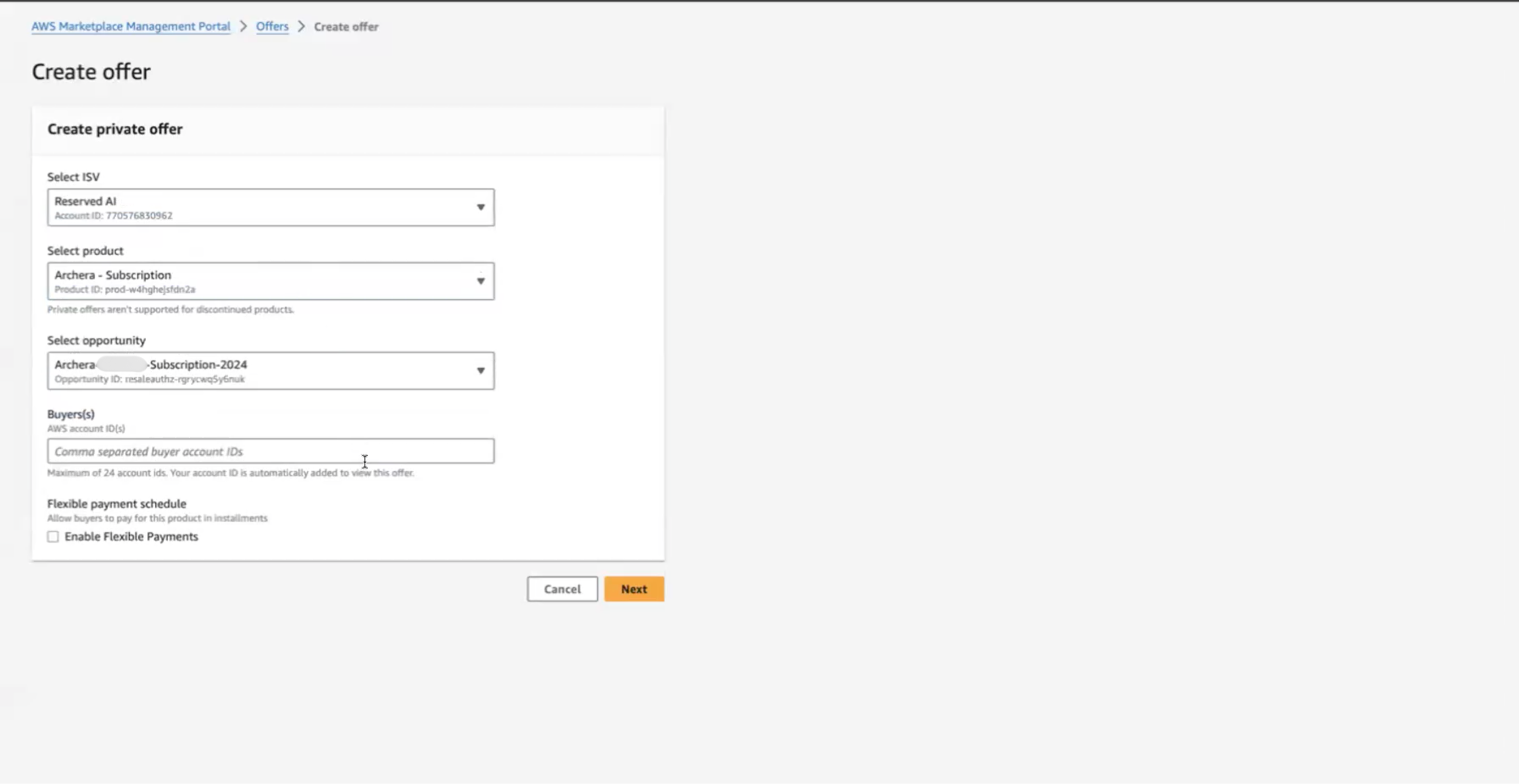
#### Step 1: Create Private Offer
Navigate to [AWS Marketplace Management Portal > Offers > Create offer](https://aws.amazon.com/marketplace/management/offers)Select the following:
* **Select ISV**: Reserved AI
* **Select product**: Archera - Subscription
* **Select opportunity**: Archera-\[Partner]-Subscription-2024
* **Buyer(s)**: Enter comma separated buyer account IDs
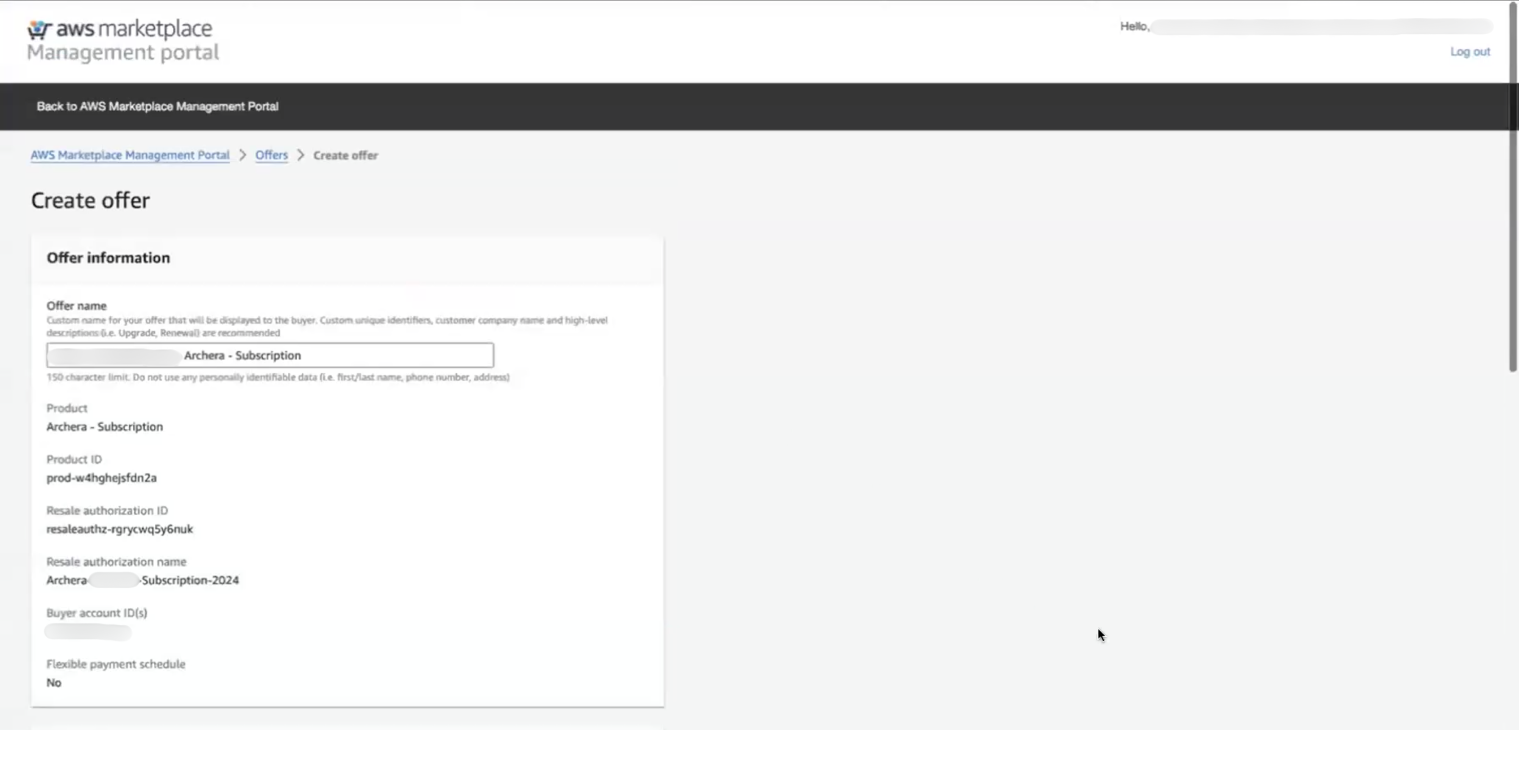
#### Step 2: Configure Offer Information
On the offer information page:
* **Offer name**: Enter a descriptive name (e.g., “Archera - Subscription”)
* **Product**: Archera - Subscription (pre-filled)
* **Resale authorization name**: Archera-\[Partner]-Subscription-2024 (pre-filled)
* **Buyer account ID(s)**: Verify customer account IDs
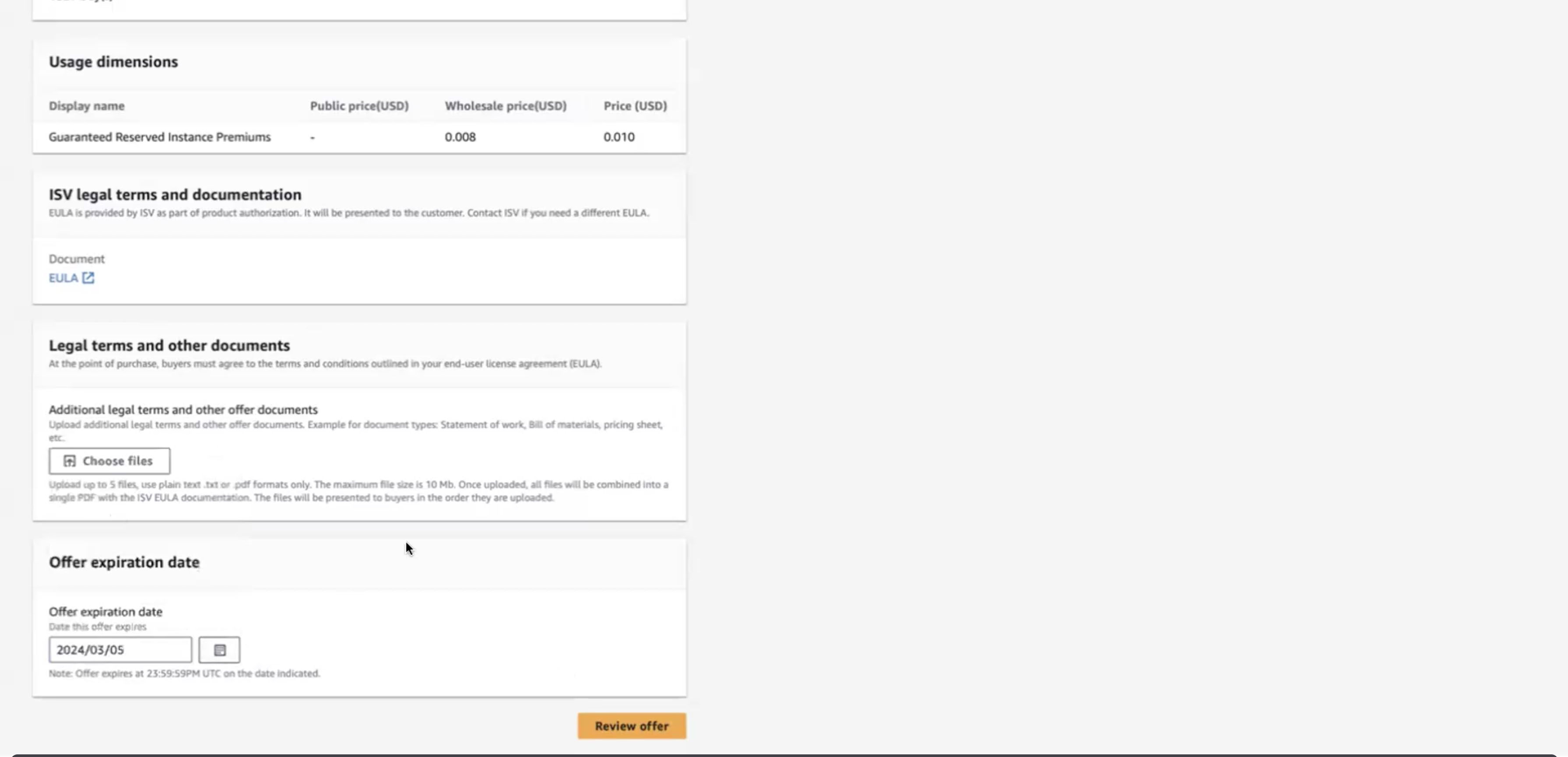
#### Step 3: Set Pricing and Usage Dimensions
The usage dimension shown will be **Guaranteed Reserved Instance Premiums**.
{% hint style="warning" %}
**Critical**: Set the markup to **25%**. This brings premiums from wholesale 0.008 to price 0.010.
{% endhint %}
{% hint style="info" %}
Higher tier markups (Silver and Gold) are available based on revenue milestones. Contact [**partnersupport@archera.ai**](mailto:partnersupport@archera.ai) to discuss tier upgrades.
{% endhint %}
#### Step 4: Set Usage Duration and Offer Expiration
**Usage duration:**
* Set the end date **10 years in the future** (e.g., if today is 2025/03/05, set to 2035/03/05)
* This sets the subscription term to 10 years to avoid renewal requirements
**Offer expiration date:**
* Set when this specific offer expires (when the customer can no longer accept it)
* This is typically much shorter than the usage duration (e.g., 30-90 days)
Review all details and click **Review offer** to finalize.
### Programmatic CPPO Creation
You can also create CPPOs programmatically using the AWS Marketplace Catalog API. This is useful for automating offer creation at scale.
#### Prerequisites
```shellscript
pip install boto3
```
Configure AWS credentials with marketplace permissions:
```bash
aws configure
```
***
#### Step 1: Create Draft CPPO Offer
```python
import boto3
import json
mp_client = boto3.client('marketplace-catalog', region_name='us-east-1')
# Create the changeset for a new CPPO offer
changeset = [
{
"ChangeType": "CreateOfferUsingResaleAuthorization",
"Entity": {
"Type": "Offer@1.0"
},
"DetailsDocument": {
"ResaleAuthorizationId": "resaleauthz-rgrycwq5y6nuk", # Archera resale auth ID
"Name": "Archera - Subscription for Customer ABC"
}
}
]
response = mp_client.start_change_set(
Catalog="AWSMarketplace",
ChangeSet=changeset,
ChangeSetName="Create CPPO for Customer ABC"
)
offer_id = response['ChangeSetId']
print(f"Offer creation started: {offer_id}")
```
**Save:** `offer_id` for next steps
***
#### Step 2: Set Pricing Markup
```python
# Apply your partner tier markup
changeset = [
{
"ChangeType": "UpdateMarkup",
"Entity": {
"Type": "Offer@1.0",
"Identifier": offer_id
},
"DetailsDocument": {
"Percentage": "25.0" # Bronze tier: 25% markup
}
}
]
response = mp_client.start_change_set(
Catalog="AWSMarketplace",
ChangeSet=changeset,
ChangeSetName="Set markup for Customer ABC offer"
)
```
{% hint style="info" %}
Higher tier markups (Silver and Gold) are available based on revenue milestones. Contact [**partnersupport@archera.ai**](mailto:partnersupport@archera.ai) to discuss tier upgrades.
{% endhint %}
***
#### Step 3: Set Usage Duration
```python
# Set the subscription usage duration to 10 years
changeset = [
{
"ChangeType": "UpdateValidityTerms",
"Entity": {
"Type": "Offer@1.0",
"Identifier": offer_id
},
"DetailsDocument": {
"Terms": [
{
"Type": "ValidityTerm",
"AgreementDuration": "P3650D" # 10 years = 3650 days
}
]
}
}
]
response = mp_client.start_change_set(
Catalog="AWSMarketplace",
ChangeSet=changeset,
ChangeSetName="Set usage duration for Customer ABC offer"
)
```
**Note:** Duration uses ISO 8601 format (e.g., `P3650D` = 3650 days = \~10 years)
***
#### Step 4: Add Buyer Accounts and Publish
```python
# Add buyer account IDs and publish the offer
changeset = [
{
"ChangeType": "UpdateTargeting",
"Entity": {
"Type": "Offer@1.0",
"Identifier": offer_id
},
"DetailsDocument": {
"PositiveTargeting": {
"BuyerAccounts": ["123456789012", "987654321098"]
}
}
},
{
"ChangeType": "ReleaseOffer",
"Entity": {
"Type": "Offer@1.0",
"Identifier": offer_id
},
"DetailsDocument": {}
}
]
response = mp_client.start_change_set(
Catalog="AWSMarketplace",
ChangeSet=changeset,
ChangeSetName="Publish CPPO for Customer ABC"
)
print(f"Offer published: {offer_id}")
```
***
#### Complete Reference
For more examples and advanced scenarios, see the [AWS Marketplace reference code on GitHub](https://github.com/aws-samples/aws-marketplace-reference-code/tree/main/python/src/catalog_api/channel_partner_offers).
{% hint style="info" %}
If you’d like help implementing programmatic CPPO creation, reach out to [**partnersupport@archera.ai**](mailto:partnersupport@archera.ai) or in the shared Slack workspace.
{% endhint %}
### Important Notes
* Ensure that you have the necessary permissions to access and manage private offers
* Double-check that you are selecting the correct offer related to Archera products/services
* Contact [**partnersupport@archera.ai**](mailto:partnersupport@archera.ai) if you need assistance with CPPO setup
---
# Agent Instructions
This documentation is published with GitBook. GitBook is the documentation platform designed so that both humans and AI agents can read, navigate, and reason over technical content effectively. Learn more at gitbook.com.
## Querying This Documentation
If you need additional information that is not directly available in this page, you can query the documentation by asking a question.
Perform an HTTP GET request on the following URL with the `ask` and `goal` query parameters:
```
GET https://docs.archera.ai/help-center/partner-guides/create-cppo-offers-for-archera-subscription.md?ask=&goal=
```
`ask` is the immediate question: it should be specific, self-contained, and written in natural language.
`goal` is what the user is ultimately trying to achieve, the reason they need the answer. Sharing it helps GitBook give you a better, more relevant answer. A goal is most helpful when it describes the outcome the user wants rather than restating the question. For example, with `ask=how do I create an API token`, a goal like `automate deployments from our CI pipeline` lets GitBook tailor the answer to that use case.
The response will contain a direct answer to the question and relevant excerpts and sources from the documentation.
Use this mechanism when the answer is not explicitly present in the current page, you need clarification or additional context, or you want to retrieve related documentation sections.