# How to Sign Up with Archera

Getting started with Archera is straightforward and designed to have you optimizing costs within minutes. Follow this guide to set up your account and begin your cloud cost optimization journey.

### ​Prerequisites <a href="#prerequisites" id="prerequisites"></a>

Before getting started, ensure you have:

<table data-card-size="large" data-view="cards"><thead><tr><th></th></tr></thead><tbody><tr><td><p><strong>Cloud Account Access</strong></p><p><strong>Account Permissions</strong></p><ul><li>Cloud account with billing access (AWS, Azure, or GCP)</li><li>Ability to create necessary integrations</li><li>Cost and usage data access</li></ul></td></tr><tr><td><p><strong>Cost Visibility Setup</strong></p><p><strong>Cost Management Tools</strong></p><ul><li>AWS: Cost and Usage Reports (CUR) configured</li><li>Azure: Cost Management + Billing enabled</li><li>GCP: Billing export configured</li><li>Basic understanding of your spending patterns</li></ul></td></tr><tr><td><p><strong>Basic Understanding</strong></p><p><strong>Cloud Knowledge</strong></p><ul><li>Familiarity with your cloud services</li><li>Understanding of your workload patterns</li><li>Desire to optimize cloud costs</li></ul></td></tr><tr><td><p><strong>Baseline Analysis</strong></p><p><strong>Current State Knowledge</strong></p><ul><li>Knowledge of top spending services</li><li>Understanding of usage patterns</li><li>Existing cost monitoring practices</li></ul></td></tr></tbody></table>

{% hint style="info" %}
**Recommended**: Set up native cost management tools (AWS Cost Explorer, Azure Cost Management, GCP Billing) before connecting to Archera. This provides baseline understanding and enables better optimization decisions.
{% endhint %}

### ​Step 1: Create Your Archera Account <a href="#step-1-create-your-archera-account" id="step-1-create-your-archera-account"></a>

{% stepper %}
{% step %}
**Navigate to Archera**

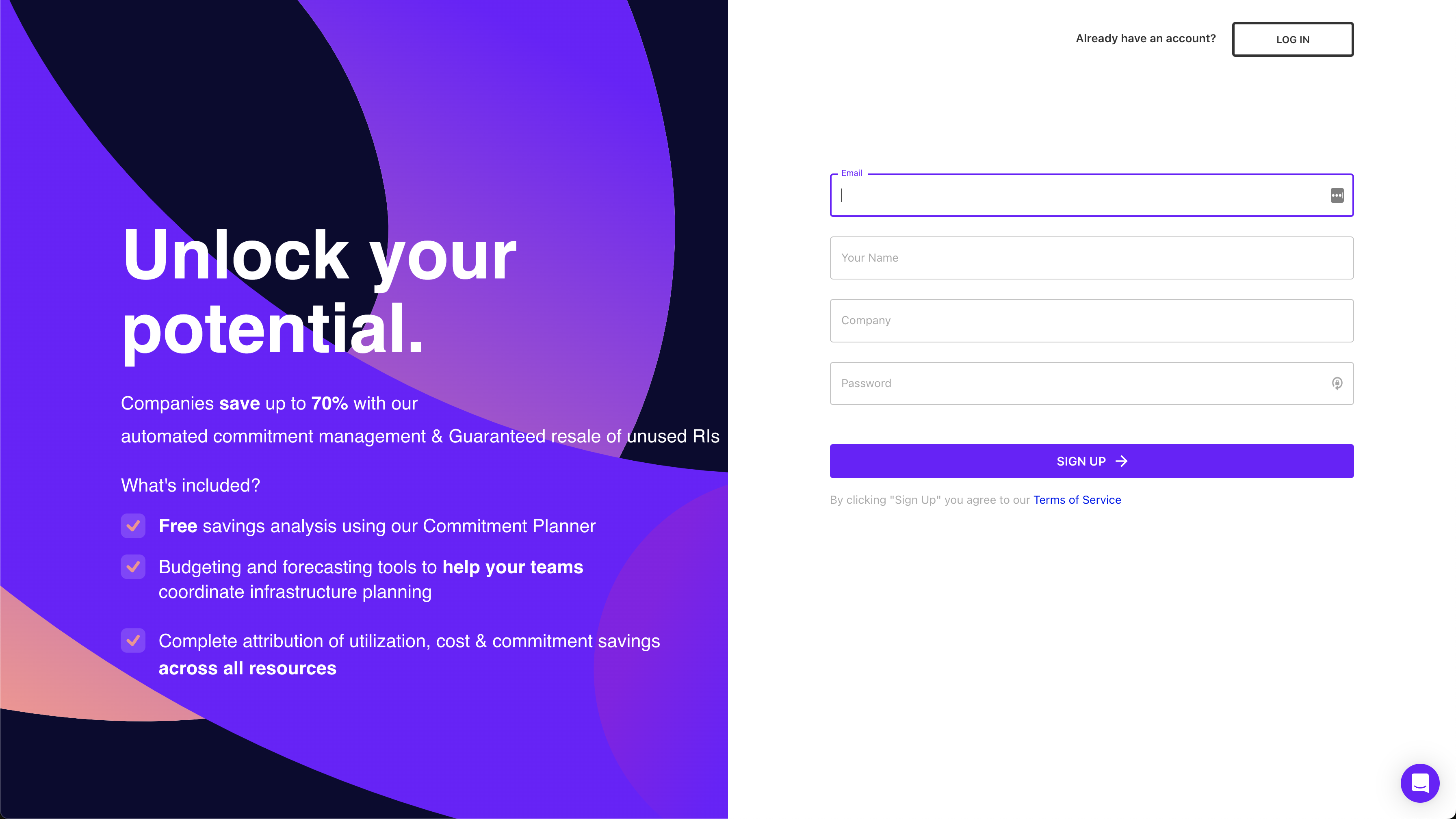
Go to [app.archera.ai](https://app.archera.ai/) and click “Sign Up” to create your account

<figure><img src="https://mintcdn.com/archera/cCBfcsubiIlPNh4r/images/signup-archera.png?fit=max&#x26;auto=format&#x26;n=cCBfcsubiIlPNh4r&#x26;q=85&#x26;s=b0603dcb3fdb4ce79183af18e0c9ec97" alt=""><figcaption></figcaption></figure>
{% endstep %}

{% step %}
**Provide Account Details**

Enter your email, create a password, and provide basic organization information
{% endstep %}

{% step %}
**Verify Your Email**

Check your inbox for a verification email and click the confirmation link
{% endstep %}

{% step %}
**Complete Profile Setup**

Add your name, role, and organization details to complete your profile
{% endstep %}
{% endstepper %}

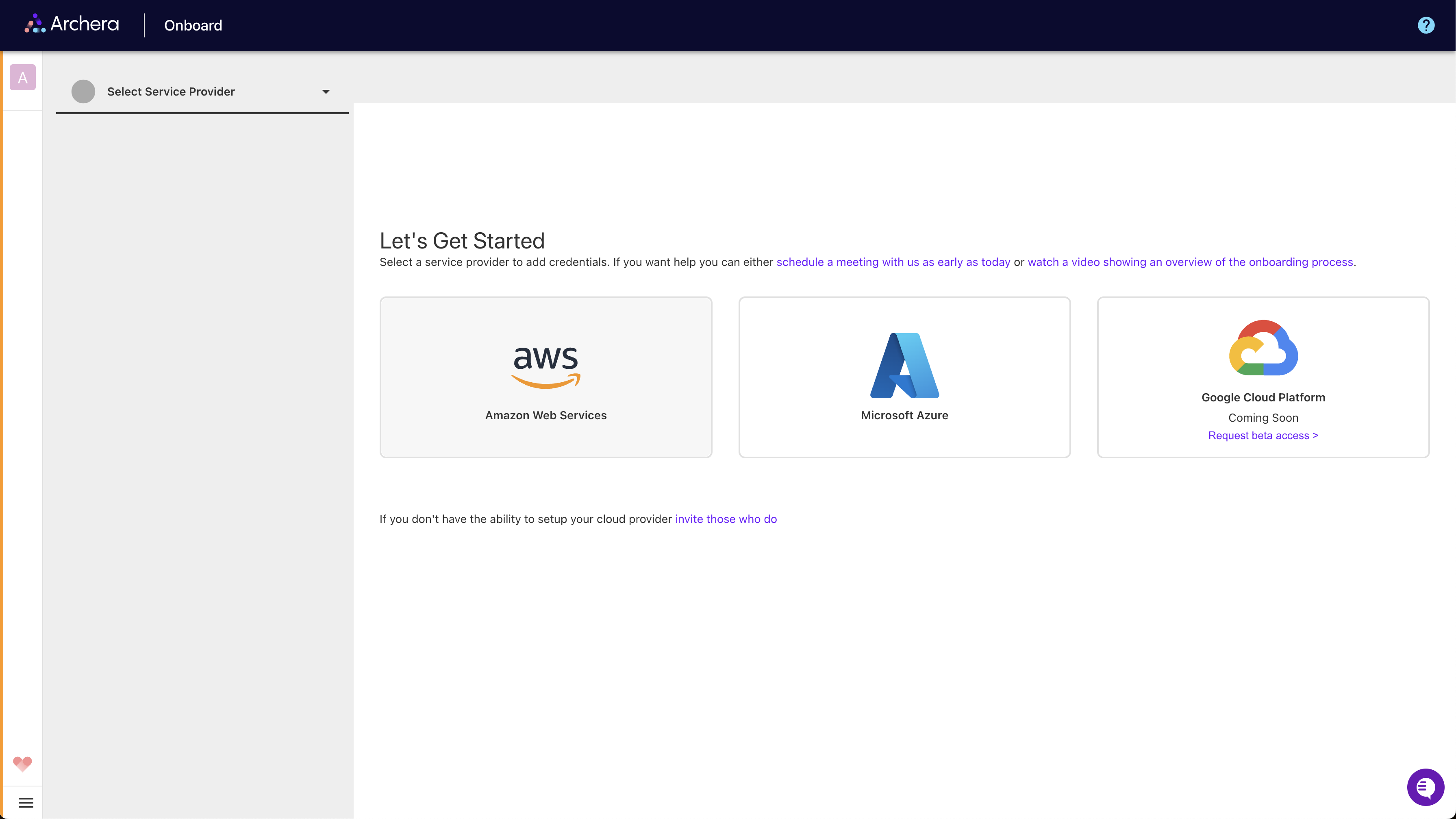
### ​Step 2: Connect Your Cloud Provider <a href="#step-2-connect-your-cloud-provider" id="step-2-connect-your-cloud-provider"></a>

Once your account is created, you’ll need to connect your cloud environment. Archera supports AWS, Azure, and Google Cloud Platform.

<figure><img src="https://mintcdn.com/archera/cCBfcsubiIlPNh4r/images/choose-provider-step.png?fit=max&#x26;auto=format&#x26;n=cCBfcsubiIlPNh4r&#x26;q=85&#x26;s=8a8d30ea9d2428d9647103374166622c" alt=""><figcaption></figcaption></figure>

#### ​Cloud Provider Integration <a href="#cloud-provider-integration" id="cloud-provider-integration"></a>

Archera uses secure, native integration methods for each cloud provider:

<details open>

<summary>AWS Integration</summary>

**CloudFormation Deployment:**

1. **Launch CloudFormation Stack**: Pre-configured template for secure integration
2. **IAM Role Creation**: Read-only role for cost analysis
3. **Minimal Permissions**: Only cost optimization permissions
4. **No Infrastructure Access**: Never accesses running workloads

   ![CloudFormation Screenshot](https://mintcdn.com/archera/cCBfcsubiIlPNh4r/images/cloudformation-screenshot.png?fit=max\&auto=format\&n=cCBfcsubiIlPNh4r\&q=85\&s=835ec26f9ca18d75cd3bc8780d1179df)

</details>

<details open>

<summary>Azure Integration</summary>

**Service Principal Setup:**

1. **App Registration**: Create service principal in Azure AD
2. **Reader Permissions**: Billing and cost management access
3. **Secure Connection**: OAuth-based authentication
4. **Cost Data Only**: No access to operational resources

</details>

<details open>

<summary>Google Cloud Integration</summary>

**Service Account Configuration:**

1. **Service Account**: Create dedicated service account
2. **Billing Permissions**: Cloud billing and asset inventory access
3. **JSON Key**: Secure key-based authentication
4. **Read-Only Access**: No modification permissions

</details>

<details open>

<summary>What Archera Accesses</summary>

**Required Data Access:**

* **Cost and Usage Data**: To analyze spending patterns
* **Resource Information**: To recommend appropriate commitments
* **Billing Information**: To calculate potential savings

**What Archera NEVER Accesses:**

* Your application data or workloads
* Running instances or services
* Security configurations
* Any operational infrastructure

</details>

#### ​Connection Process <a href="#connection-process" id="connection-process"></a>

{% stepper %}
{% step %}
**Select Cloud Provider**

Choose your cloud provider (AWS, Azure, or Google Cloud) from the integration options
{% endstep %}

{% step %}
**Follow Provider Instructions**

Each provider has specific integration steps guided by the platform
{% endstep %}

{% step %}
**Review Permissions**

Review the access permissions that will be granted
{% endstep %}

{% step %}
**Complete Integration**

Confirm the connection and verify successful integration
{% endstep %}
{% endstepper %}

### ​Step 3: Initial Cost Analysis <a href="#step-3-initial-cost-analysis" id="step-3-initial-cost-analysis"></a>

After connecting your cloud account, Archera will begin analyzing your usage:

{% hint style="info" %}
**Onboarding Process**: Connection is completely free and purely to access your billing data so Archera can make accurate recommendations based on your actual usage numbers. After connecting, it takes **24-48 hours** to unlock the full platform as historical data is processed.
{% endhint %}

#### ​Data Processing Timeline <a href="#data-processing-timeline" id="data-processing-timeline"></a>

#### &#x20;<a href="#data-processing-timeline" id="data-processing-timeline"></a>

<table data-card-size="large" data-view="cards"><thead><tr><th></th></tr></thead><tbody><tr><td><p><strong>Initial Connection</strong></p><p><strong>5-10 Minutes</strong></p><ul><li>Account connection verification</li><li>Basic cost data import</li><li>Infrastructure discovery</li></ul></td></tr><tr><td><p><strong>Full Platform Access</strong></p><p><strong>24-48 Hours</strong></p><ul><li>Historical usage analysis</li><li>Savings opportunity identification</li><li>Complete platform functionality unlocked</li></ul></td></tr></tbody></table>

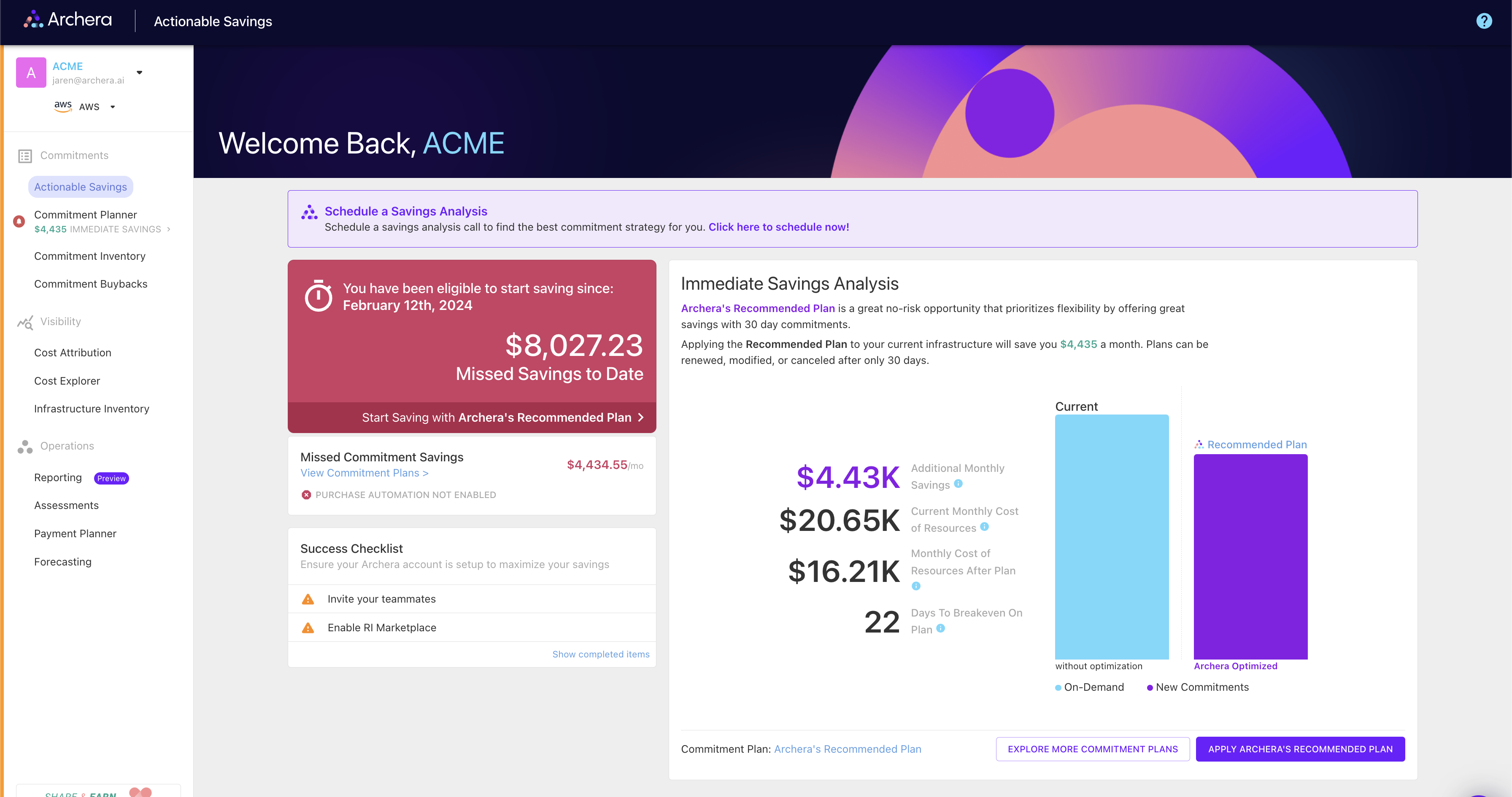
#### ​What You’ll See First <a href="#what-youll-see-first" id="what-youll-see-first"></a>

Once initial processing completes, you’ll have access to:

<figure><img src="https://mintcdn.com/archera/cCBfcsubiIlPNh4r/images/immediate-savings-analysis.png?fit=max&#x26;auto=format&#x26;n=cCBfcsubiIlPNh4r&#x26;q=85&#x26;s=8690757d60cf9321a5502bdd7094c0be" alt=""><figcaption></figcaption></figure>

1. **Immediate Savings Analysis**: Quick wins for covering on-demand usage with short-term commitments
2. **Commitment Planner**: Three default strategies (Recommended, Balanced, High Savings)
3. **Cost Dashboard**: Overview of your current spending and optimization opportunities

### ​Step 4: Explore Your Savings Opportunities <a href="#step-4-explore-your-savings-opportunities" id="step-4-explore-your-savings-opportunities"></a>

#### ​Immediate Savings Analysis <a href="#immediate-savings-analysis" id="immediate-savings-analysis"></a>

Your first view will show immediate opportunities to cover on-demand usage with 30-day commitments:

* **Stop the Bleeding**: Identify on-demand resources that should have commitments
* **Quick Implementation**: Apply 30-day commitments for immediate savings
* **Risk-Free Start**: Begin optimization without long-term commitments

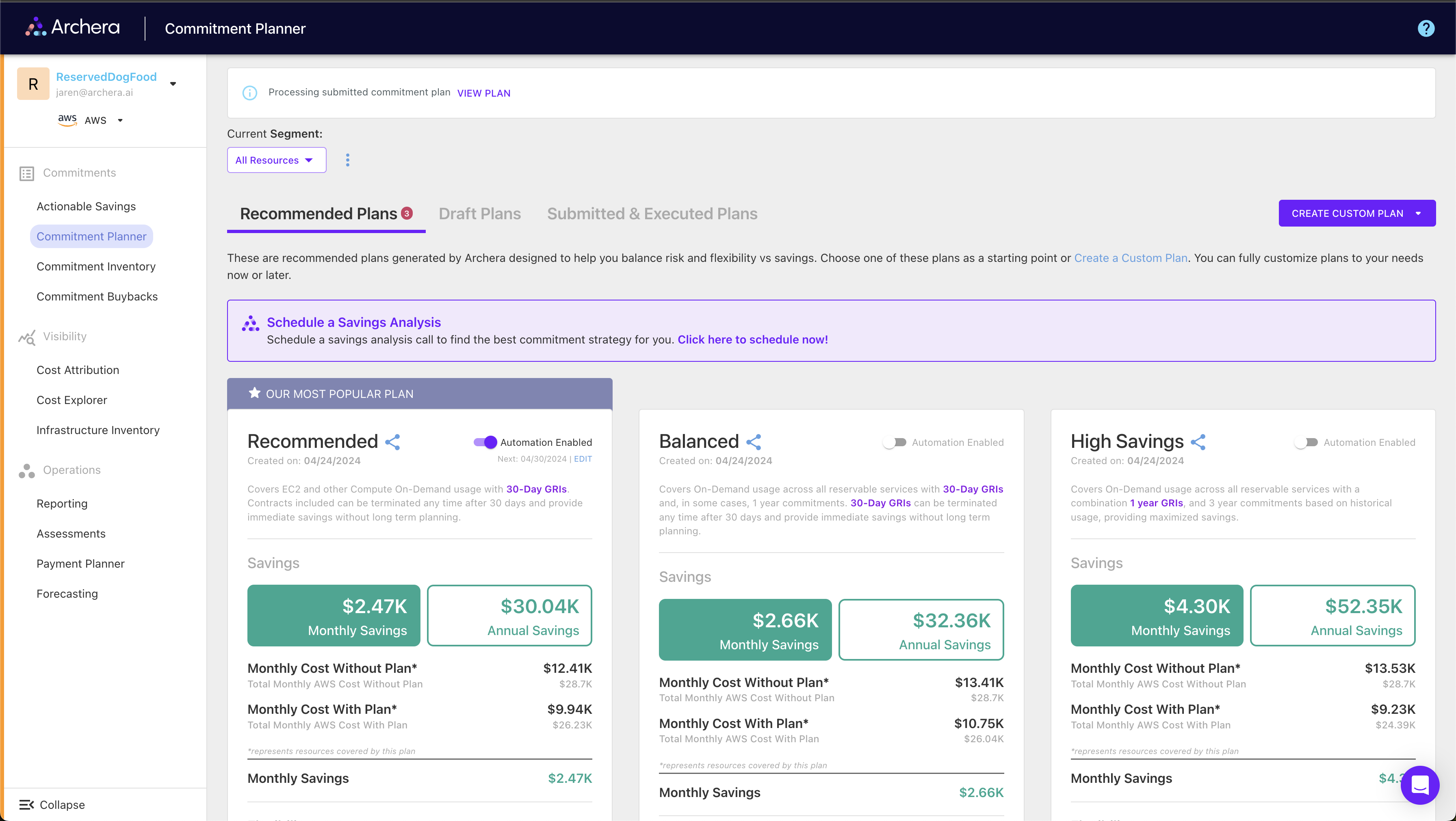
#### ​Commitment Planner <a href="#commitment-planner" id="commitment-planner"></a>

Explore three pre-configured commitment strategies:

<figure><img src="https://mintcdn.com/archera/cCBfcsubiIlPNh4r/images/default-commitment-plans.png?fit=max&#x26;auto=format&#x26;n=cCBfcsubiIlPNh4r&#x26;q=85&#x26;s=7994b668ed1c319788cb26aca1a5b558" alt=""><figcaption></figcaption></figure>

<details open>

<summary>Recommended Plan</summary>

**Focus**: Maximum flexibility with immediate savings

* Primarily 30-day guaranteed commitments
* Lowest risk, moderate savings
* Perfect for getting started

</details>

<details open>

<summary>Balanced Plan</summary>

**Focus**: Optimal balance of savings and flexibility

* All reservable services included
* Mix of 30-day and 1-year commitments
* Most popular choice for ongoing optimization

</details>

<details open>

<summary>High Savings Plan</summary>

**Focus**: Maximum cost reduction

* 3-year commitments with upfront payments
* Highest savings potential
* Reduced flexibility, maximum discounts

</details>

### ​Step 5: Implement Your First Plan <a href="#step-5-implement-your-first-plan" id="step-5-implement-your-first-plan"></a>

#### ​Applying a Commitment Plan <a href="#applying-a-commitment-plan" id="applying-a-commitment-plan"></a>

#### &#x20;<a href="#applying-a-commitment-plan" id="applying-a-commitment-plan"></a>

{% stepper %}
{% step %}
**Select Your Strategy**

Choose from Recommended, Balanced, or High Savings plans
{% endstep %}

{% step %}
**Review Details**

Click “View Details” to see specific commitments and covered infrastructure
{% endstep %}

{% step %}
**Customize if Needed**

Edit individual line items or create custom plans as desired
{% endstep %}

{% step %}
**Apply Plan**

Click “Apply Plan” to implement your chosen strategy and start saving
{% endstep %}
{% endstepper %}

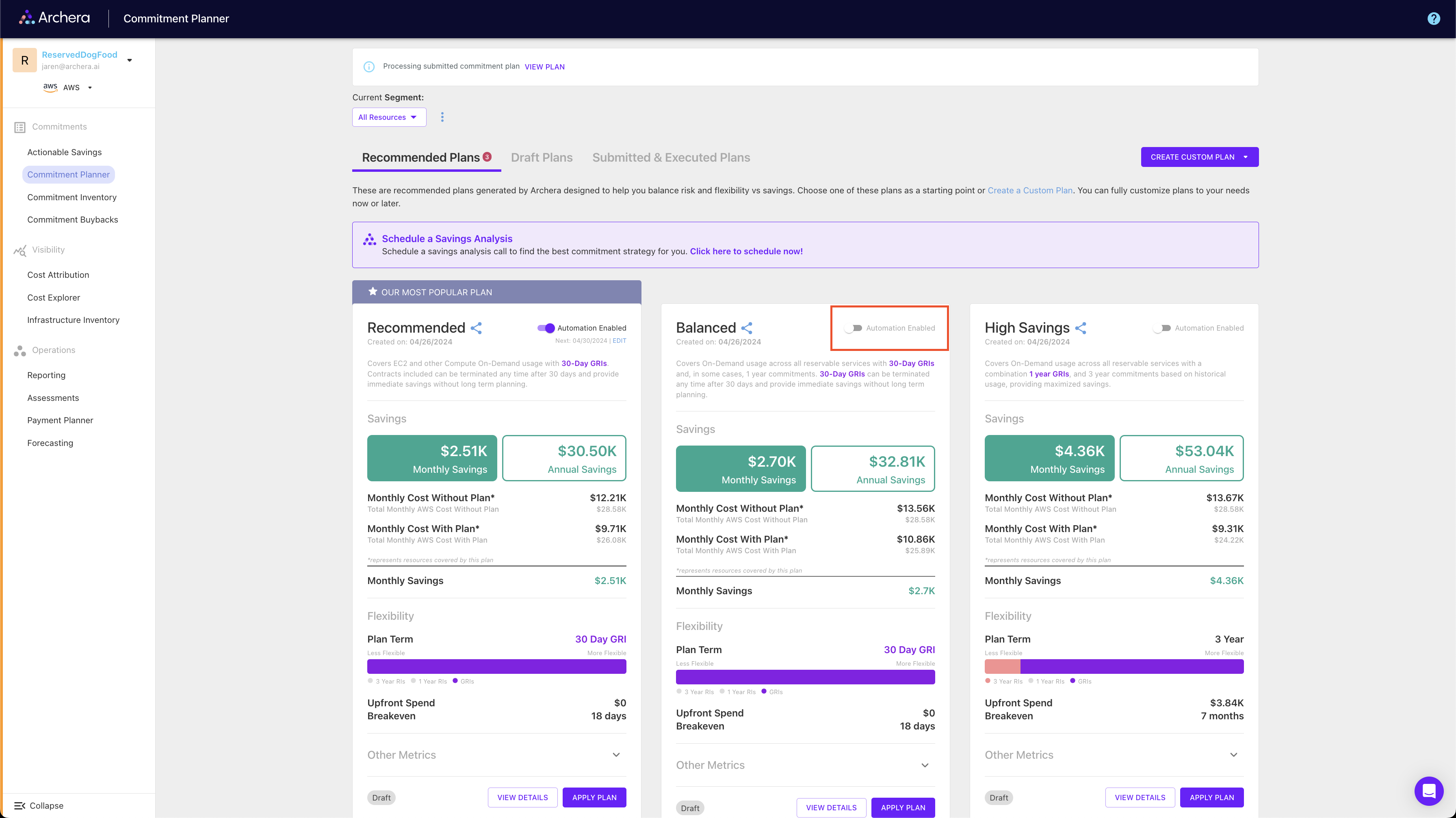
#### ​Setting Up Automation (Optional) <a href="#setting-up-automation-optional" id="setting-up-automation-optional"></a>

Enable automation policies for hands-off optimization:

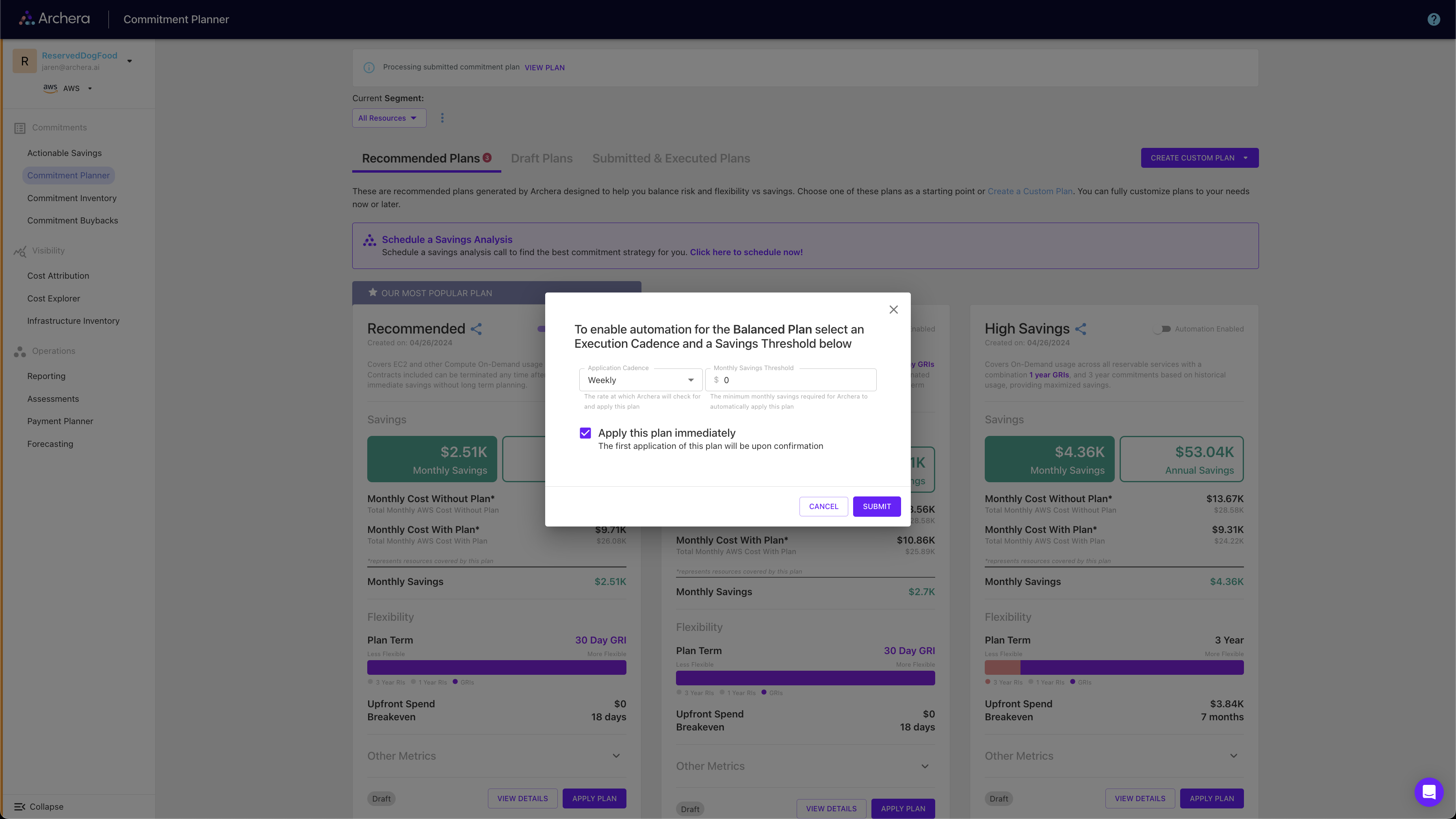
<figure><img src="https://mintcdn.com/archera/cCBfcsubiIlPNh4r/images/automation-toggle.png?fit=max&#x26;auto=format&#x26;n=cCBfcsubiIlPNh4r&#x26;q=85&#x26;s=1620a83cff379bcac1911600701e381a" alt=""><figcaption></figcaption></figure>

1. **Configure Thresholds**: Set minimum savings amounts to trigger automation
2. **Choose Cadence**: Select weekly, monthly, or quarterly evaluation
3. **Monitor Performance**: Track automated savings and adjust as needed
4. **Maintain Control**: Cancel or modify policies anytime

<figure><img src="https://mintcdn.com/archera/cCBfcsubiIlPNh4r/images/automation-modal.png?fit=max&#x26;auto=format&#x26;n=cCBfcsubiIlPNh4r&#x26;q=85&#x26;s=881cbcc527dd0e8705f6b40e0fdd4bf5" alt=""><figcaption></figcaption></figure>

### ​Step 6: Ongoing Management <a href="#step-6-ongoing-management" id="step-6-ongoing-management"></a>

#### ​Platform Features <a href="#platform-features" id="platform-features"></a>

Once you’re up and running, take advantage of:

<table data-card-size="large" data-view="cards"><thead><tr><th></th></tr></thead><tbody><tr><td><p><strong>Custom Plan Creation</strong></p><p><strong>Build Your Own Strategy</strong></p><ul><li>Create plans tailored to your needs</li><li>Mix commitment types and terms</li><li>Save and share plans with your team</li></ul></td></tr><tr><td><p><strong>Performance Monitoring</strong></p><p><strong>Track Your Success</strong></p><ul><li>Monitor utilization and savings</li><li>View breakeven timelines</li><li>Analyze coverage across services</li></ul></td></tr><tr><td><p><strong>Team Collaboration</strong></p><p><strong>Multi-User Support</strong></p><ul><li>Invite team members</li><li>Set permissions and roles</li><li>Share plans and reports</li></ul></td></tr><tr><td><p><strong>API Integration</strong></p><p><strong>Programmatic Access</strong></p><ul><li>REST API for custom integrations</li><li>Export data for reporting</li><li>Automate workflows</li></ul></td></tr></tbody></table>

#### ​Best Practices <a href="#best-practices" id="best-practices"></a>

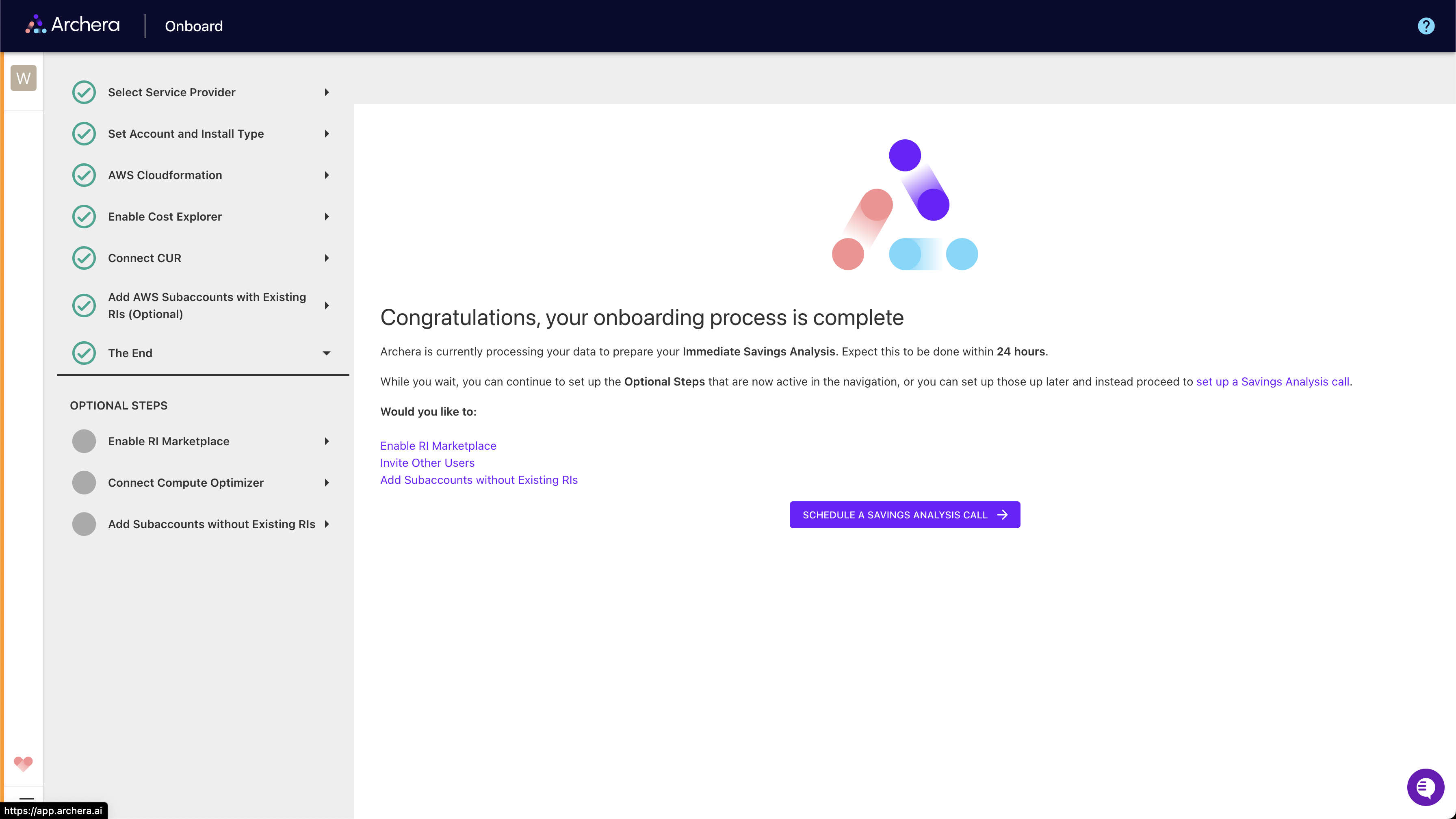
1. **Start Small**: Begin with 30-day commitments to understand the platform
2. **Monitor Regularly**: Review savings and utilization weekly
3. **Use Automation**: Enable policies once comfortable with manual optimization
4. **Plan Ahead**: Consider business changes when selecting commitment terms

<figure><img src="https://mintcdn.com/archera/cCBfcsubiIlPNh4r/images/onboarding-end.png?fit=max&#x26;auto=format&#x26;n=cCBfcsubiIlPNh4r&#x26;q=85&#x26;s=a071953270bf4c36395d5c22ff11cd32" alt=""><figcaption></figcaption></figure>

### ​Security and Compliance <a href="#security-and-compliance" id="security-and-compliance"></a>

Archera maintains enterprise-grade security:

* **SOC 2 Type II Compliance**: Audited security controls and processes
* **Least Privilege Access**: Minimal required permissions for cost optimization
* **No Data Storage**: Cost data processed in real-time, not stored
* **Encryption**: All data transmitted using industry-standard encryption

{% hint style="info" %}
**Free Platform**: Archera’s platform is completely free to use. Connection is purely to access billing data for accurate recommendations. There are no hidden fees, and you keep 100% of your optimized savings. Full platform access is available 24-48 hours after connecting your cloud account.
{% endhint %}